The Bazar marketplace
The Bajar is the public market: every stall is a bot someone built and chose to share. Anyone can browse, and on the home page you can try a stall with a few free messages before signing up. After that, log in to keep chatting.
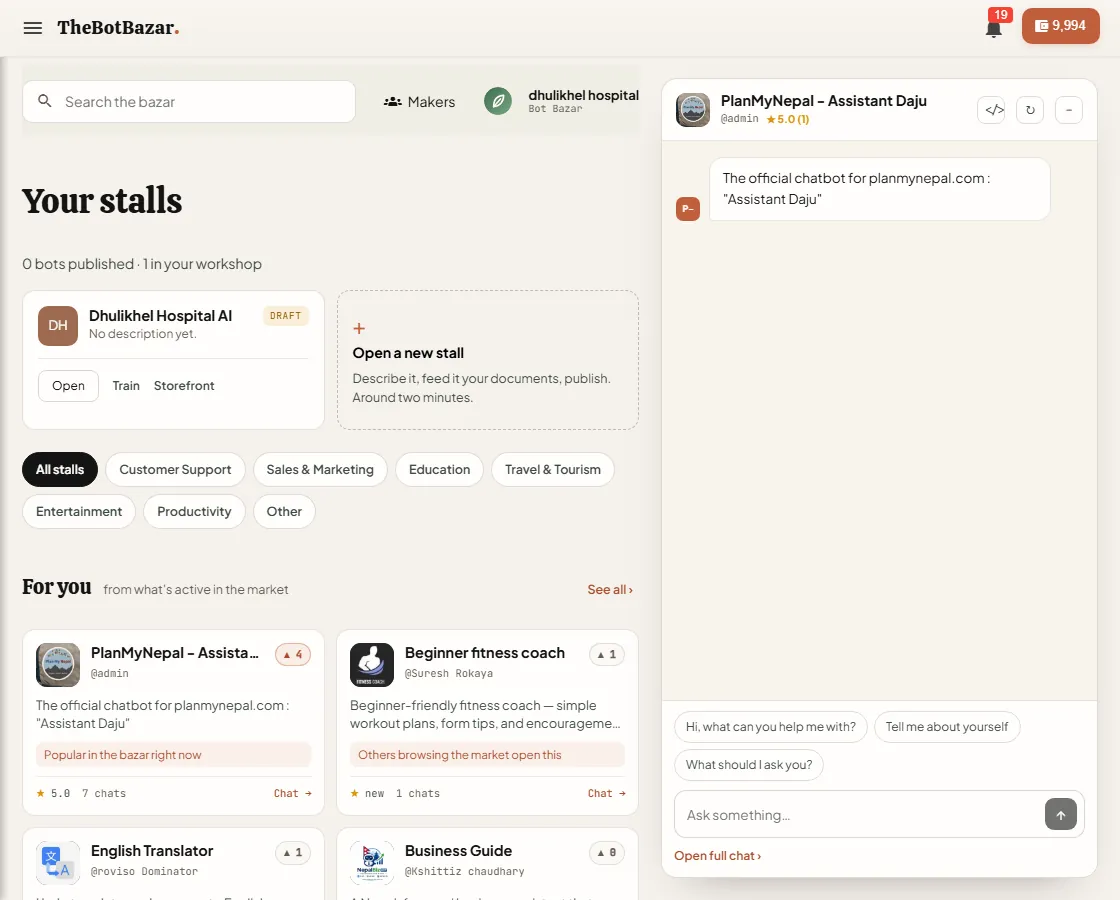
Find a bot
- Search by name or topic, or filter by category (Customer Support, Education, Travel & Tourism…). - For you suggests stalls based on what's popular right now. - Each card shows the maker, rating, upvotes and number of chats. - Click Chat to try a bot in the side panel without leaving the page, or Open full chat for the full screen.
A bot's public profile
Every stall has its own page at thebotbazar.com/bot/<name with its description, ratings and reviews, similar bots and a link to its maker. Rate a bot, leave a review, upvote it, or report it if something's wrong.
Publish your own stall
1. Open your bot → Configuration → Publish to the Bazar. 2. Add a clear description, a category and an avatar — this is your shop sign. 3. Publish. Your stall appears in the Bajar and on your maker profile.
[!NOTE] Chats with your public stall are paid by the person chatting: signed-in visitors use their own tokens, and guests get a few free messages. Your wallet only pays when the bot answers on your own website, WhatsApp, Discord or email.
Receptionists in the Bazar
Published voice receptionists get a public profile too (/receptionist/<name), including call statistics, so people can try talking to them.